A website, explained properly.

What one is actually made of, what we do, and how to tell whether you even need one. No jargon, and no pitch at the end of it.

How a build happens

The spec sheet

The first step: building your own spec in the configurator.

You build the spec yourself. Choose the pages you need and the features you want, and the price moves as you go, in real time. That means no waiting on a quote, and no number arriving out of thin air. The configurator finishes with a deposit that stays refundable until your build is actually under way, and books one of our build slots as yours so nobody else has our attention while we build it.

What comes out is a spec sheet like the one on the right: the features, the costs, the dates that matter and what is needed from you. It stays live, so if you add or remove something later, the document changes with it.

Build your own spec
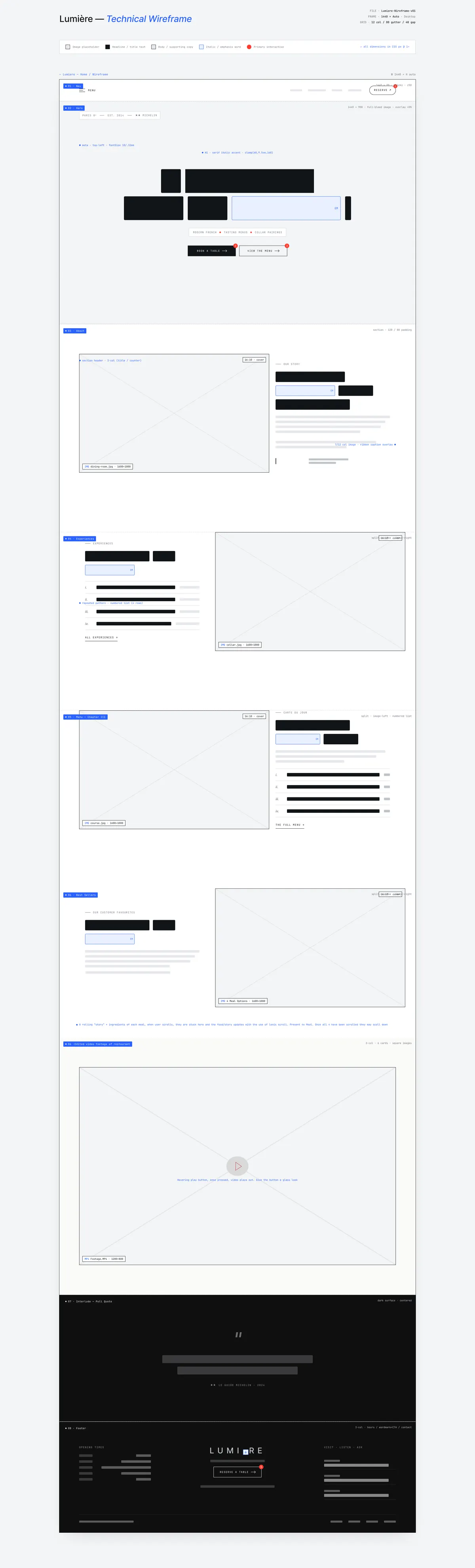

The wireframe

Then we draw the blueprint.

A wireframe is your website simplified into boxes. Every block is drawn to plan the layout: where each section ends up, and where the hotspots sit for the buttons that matter, like booking. You get to review it before we add any branding and turn it into something you would be proud of, and that review does not count against your revisions.

It is the cheapest place in the whole project to change your mind. Moving a box takes a minute. Moving a finished page takes a week.

The content workspace

We work together to make sure the words on your site mean something.

We draft every page from your kickoff call, using a set of questions chosen to get the right information out of it the first time. Once the copy is drafted we send a simple document you can edit freely, in case we have missed something or it does not quite sound like you.

We do the heavy lifting and you keep us honest to your own voice, which keeps your time on our tools to a minimum. We used to ask clients to write their own copy, and working on it together turned out to be far better.

The design

This is where it gets exciting.

What was an idea, a page of blocks and some loose text becomes the thing you had only pictured. We send you a private link nobody else can open, and you tell us what you love and what you do not. Your tier sets how many rounds of changes you get, and that number is small on purpose: most of what would have caused changes should already be settled in the stages before.

Design goes last so it never has to be redone. When the look is decided first, every later change is a redesign.

Four things you only get if Onlineify build your site.

A content system shaped around your business, a folder layout any developer can read, code with the reasoning written into it, and no rent to pay us afterwards.

A template gives you somebody else’s shape and none of the explanation. That is why everything we build is custom.

The content system

What is a CMS?

Three letters that stand for Content Management System, which is a technical way of saying: the screen you go to when you want to make small changes to your site. No code required. A well laid-out system that makes all your titles, descriptions, opening hours and images editable. We put your fully custom site into easy-to-use software where you can edit it without being a computer whizz.

Every tier on our pricing page says "CMS". This is the thing it is promising, and it is worth knowing what you are being sold before you buy it.

Not a page builder, not a blank canvas, not a hundred settings you will never touch. Just software that lets you add a line, editable from your phone at eight in the morning.

Harbour & Ember · Menu

Dishes

The menu

The menu moves with the boats. This is a taste of a typical day.

  1. i. Day-boat catch, ember butter, sea herbs £24
  2. ii. Charred mackerel, gooseberry, horseradish £14
  3. iii. Wood-fired plaice, brown shrimp, capers £26
  4. iv. Smoked cod's roe, grilled sourdough £9

A demonstration. The real editor is Sanity.

The file tree

A folder layout anybody can read.

Plainly named files in obvious places. Everything a visitor reads sits in one file per thing (the listings in properties.ts, the posts in posts.ts) and the whole lot lives in an account in your name, not ours.

We ensure all the code and assets are easily to find and edit. Zero hassle.

src
Projects › mysite › src
src
components
data
layouts
pages
components File folder
data File folder
layouts File folder
pages File folder
Hero.astro Astro component 2 KB
Featured.astro Astro component 3 KB ← the listings you can see
Services.astro Astro component 2 KB
About.astro Astro component 1 KB
Footer.astro Astro component 1 KB
properties.ts TypeScript file 6 KB ← every listing, in one file
posts.ts TypeScript file 2 KB
index.astro Astro page 2 KB
properties.astro Astro page 3 KB
sell.astro Astro page 1 KB
components File folder
data File folder
layouts File folder
pages File folder

The code

The reasoning is written into it.

Every awkward decision carries a comment saying why it is that way, and what breaks if you change it. Any person who opens this inherits the thinking, not just the code.

This allows you to understand the reasoning, even if you don't understand the code.

// Lower-case roman numerals for the menu's dish markers.
//
// The editor lets you add and remove dishes, so the numerals cannot be
// stored with the dishes themselves. They are worked out from position,
// fresh, every time the list changes.
//
// Delete the third dish and the fourth has to become the third. A menu
// still reading "iv." after a deletion is exactly the kind of small
// wrongness this section says we design out.
export function toRoman(position: number): string {

A real comment from this page's own code. It is why the menu above renumbers itself when you delete a dish.

The ownership

No rent, and nothing held hostage.

There is no required Onlineify subscription. Once the build is paid we do not bill you again to keep the site online. There is no switch on our side that could take it down if you stopped. Hosting and the content system both sit on free tiers to ensure the lowest running costs possible with the best features. So the only guaranteed running cost is your domain renewal, paid to the registrar at cost.

Stop renting your digital assets and start building with Onlineify.

Where your site actually lives

The domain Your registrar account no access needed
Hosting Your Cloudflare account collaborator
The code Your GitHub repository collaborator
The content system Your Sanity project admin
Analytics Your Cloudflare and Google accounts viewer
Google Business Profile Your Google account manager

Every account is opened in your name. Remove us from all six and the site carries on exactly as it is.

We are a collaborator on your accounts, never the owner of them.

Almost nobody looks past the first five.

Where you land on the results page decides whether you exist. The top few take nearly all the clicks, and everything under them shares what is left over.

So the work is not “get on Google”. You are already there, on page two, where nobody goes. It is moving up, which is winnable, and then staying there, which is the part nobody warns you about.

Being found

What is SEO?

Three letters that stand for Search Engine Optimisation, which is a technical way of saying: the work that decides where a search puts your business in front of a potential customer. Not advertising. Nothing here is being paid for a place.

Every tier on our pricing page says "on-page SEO". That is the part you can see: the title and the description a search prints about you, written so they say what you actually do and where you do it.

The rest of it is not visible at all. Where you land on the page, what a search engine can read once it arrives, and whether anybody has tended any of it since launch. Those three are below, and they are the ones that move you.

  1. Where you land on the page

    First place takes roughly as many clicks as everything below it put together. Position eight gets about one for every hundred the top spot gets. Being listed and being found are not the same thing, and only one of them rings the phone.

  2. What is actually on the page

    Schema, meta descriptions and a sitemap: three plain files and a bit of markup that tell a search engine what your business is, where it is and what it sells. Every build gets them from day one. They are not an upgrade.

  3. Whether anybody has tended it since

    This is the one nobody mentions. Rankings decay. Competitors publish, Google shifts, your opening hours change and nothing on the page says so. A site left completely alone slides down, slowly, without ever appearing to break.

Your Estate Agency | local homes, sold properly yourestateagency.co.uk Every listing on one page. Fast, honest, local.
100%
60%
40%
25%
15%
5%
2%
1%
most people never look past here

Someone searches…

A working model. Click share is relative to first place, not a real search result

What you get SEO StarterSEO Pro
Blog posts written for you 2 a month4 a month
On page optimisation ✓✓
Reporting each month ✓✓
Keyword strategy –✓
Link building –✓
A month, ex VAT £399£799

Optional, and cancellable. The site works without it.

A site can do more than showcase.

Ecommerce stores allow businesses to sell online, hassle free. Whether digital only, or a local brand looking to establish themselves beyond their current reach, a store can handle it all.

That makes it a different build with different parts, a different depth, and two or three unique things bespoke to this type of build.

The catalogue

Up to date stocklist, live on your shop.

A catalogue houses all your products together, in one place. On the store, this can be filtered by whatever categories you chose to have and inside your CMS (content management system) is where you can add, remove and update any product listings.

Products

Trail Shell Jacket
WindproofRecycled
Sold out

Black

Trail Shell Jacket

£159.95

Classic Logo Tee
Recycled
Sold out

Forest

Classic Logo Tee

£38.00

Trail Belt Trousers
Recycled
Sold out

Khaki

Trail Belt Trousers

£95.00

Type-01 Carabiner
Forged24 kN
Sold out

Black

Type-01 Carabiner

£26.00

Summit Bottle
InsulatedLeakproof
Sold out

Burnt Orange

Summit Bottle

£34.00

A demonstration. The real one is on Shopify, in your own account.

  • It changes weekly, not yearly

    Something sells out, a price shifts, a new line lands, a description turns out to be wrong. None of those can wait to be rectified. The catalogue allows for instant change.

  • Asking costs more than the change

    If every edit is a job you raise with somebody, you stop making them. The shop drifts, the stock stops being true, and customers order things you cannot send.

  • So this layer is yours

    Mark something out of stock at 9am, the shop updates at 9am. No ticket, no queue, and no invoice from us.

What is actually under there

A shop is deeper than it looks.

Seven layers, and a customer only ever sees the top one. Open them in order and you can see where the work goes, what is ours, and which parts we use other systems for.

  • Astro, written by us, hosted on Cloudflare. Every page a customer looks at is custom built for your store rather than picked from a library of themes. This layer decides how the shop looks, how fast it loads and how it a works across multiple different devices.

  • Sanity, with fields shaped around your business. The words and sections for the pages that are not products or your catalogue: yours to change whenever you like, without asking us and without going near the code.

  • A channel installed inside your own Shopify account, which issues a secure key the storefront reads. It is the join between the shop people look at and the engine running underneath it, and it is the piece that lets the front of your shop stay entirely custom while the commerce behind it stays entirely proven.

  • Your products, their variants, their prices and their stock, held in Shopify and pulled through into the site. Change a price, product or stock count there and the shop follows. This is the layer you will spend more time in than all the others put together.

  • Shopify’s own, running on a subdomain of your site and wearing your logo, your colours and your fonts. Cards, Apple Pay, Google Pay and Shop Pay all work from day one. Ease of access for you, but most importantly your customers.

  • Where you go to see what sold, pack it and send it. Tax rules, shipping rates, refunds and customer records live here too, in the tool built for the job and linked with the existing checkout system.

  • Schema, meta and a sitemap across the whole catalogue, with Search Console and analytics in accounts you own. On every store we build, from the first day, and never sold to you as an upgrade.

The part we integrate

Why build what you can already utilise.

We write the code for the shop itself, so the obvious question is why we stop at the checkout. The answer is that this is the most crucial piece of software on an Ecommerce store and there are systems out there with real, measured benefits.

  • 15%*

    It converts better, and that is measured

    Shopify puts its checkout an average of 15% ahead of the competition on conversion, and up to 36% ahead at the top end. That, in a nutshell, converts more visitors into paying customers.

  • 50%*

    Shop Pay is the new standard of efficient payments.

    A returning customer checks out without typing anything. Shopify reports Shop Pay converting 50% higher than a standard checkout and running around 3x faster, and it only works because it is theirs, used on thousands of stores worldwide.

  • 875M*

    Your customer may already be signed up

    Shop Pay carries hundreds of millions of customers who already have their details saved. A shop we built alone would be asking every one of them to start from scratch. Shop Pay removes this friction and makes checking out easier

  • 40,000*

    It does not fall over on your best day

    Shopify states its checkout handles 40,000 checkout starts a minute. The day you are featured somewhere and the traffic arrives all at once is the day Shopify's checkout system pays dividends.

  • Card details, addresses and customer information. All separate, all secure.

    Handling sensitive info is a big responsibility for an Ecommerce store. Utilising these systems above ensures secure checkouts and the ease of mind that you only see the relevant info.

Figures published by Shopify on its own checkout page, shopify.com/uk/checkout, read on 17 September 2026. They are Shopify’s measurements of themselves, not ours.

Who does what

Two halves, make a whole.

Below is the breakdown showing every section inside an Onlineify Ecommerce store. Splitting up what is custom built by us, and what we integrate to elevate your store.

Built by onlineify

The whole storefront Home, the range, every product page and category, designed for your business.
How the range is browsed Filtering and navigation built around what you actually sell, not what a theme shipped with.
The words Drafted by us from your kickoff call, then yours to correct until they sound like you.
Getting found Schema, meta and a sitemap across the catalogue, from day one. Never an upgrade.
The content system Sanity, with your own fields inside, so the shop is yours to change without us.
Your products and stock Added, edited and counted in your own account, in the tool built for it.
The basket and the checkout Cards, Apple Pay, Google Pay and Shop Pay, working from day one.
Orders and fulfilment Where you see what sold, pack it and send it. Tax and shipping rules live here too.
The part that touches card details Handled by a company that does nothing else. A feature, not a shortcut.

integrated by shopify

Shopify is billed to you, in your own account, on your own card, from £25 a month. It is the one thing a shop costs to run that a brochure site does not, and it is not ours to take.

Most businesses are sold the wrong advert.

There are five kinds and they do different jobs. Which one suits you is a question about your business, not about your budget.

Being sold the wrong one is the usual way an advertising budget disappears without anybody being able to say what it acheived.

Paid search

What is Google Ads?

The results marked as adverts, at the top of a search. You choose the searches you want to appear for, you write the advert, and you pay only when somebody actually clicks it. Being shown costs nothing.

Adverts and SEO are not rivals, they run on different clocks. SEO compounds: it takes a while to build and it keeps working once it is there, which is why it is the ground floor. An advert is instant and rented: live the same afternoon, for the exact words you picked, off at lunchtime and on again in the evening. You set what you are willing to spend a day, and you can see what every pound bought.

Which is also the catch. The clicks stop the day you stop paying for them, so adverts are how you buy attention while the SEO underneath earns it.

Search

Somebody is already looking for what you sell, today.

Bidding on your own name and calling it growth.

Performance Max

You have real sales data and stock that moves.

Running it first, with nothing for it to learn from.

Shopping

You sell products with prices and pictures.

A feed nobody has looked at since the day it was set up.

Demand Gen

People do not know they want it yet.

Judging it on last-click, which it will always lose.

Display

Reminding somebody who already visited.

Using it for strangers, then blaming the agency.

Sometimes the honest answer is none of them: you are not ready, or the money does more good somewhere else. We would rather say that than take on a campaign we do not believe in.

What it costs.

Not a starting point, not a range, not a quote on request. One published figure for a fixed scope, agreed before anybody starts.

  • The spec you built yourself, priced as you went
  • The wireframe, and the argument behind every box on it
  • Your words, drafted by us and corrected by you
  • A content system with your own fields in it
  • A file tree clearly labelled and designed
  • Code with the reasoning written into it
  • Schema, meta and a sitemap, from day one
  • The security headers, on every tier

All of it. On every tier. The number changes with how much site you need, not with how much of the work we are willing to do.

Lite £1,950 Excl VAT 5 pages included

You want to be found and phoned. The site earns its keep by showing up in local search and looking like a business worth calling.

  • Custom website, 5 pages
  • Contact form, straight to your inbox
  • Google Business Profile setup
  • On page SEO: schema, meta, sitemap
  • Sanity CMS to edit your own content
  • Search Console and Analytics setup
  • 1 round of revisions
  • 30 days of support after launch
Configure with Lite
Business £3,950 Excl VAT 10 pages included

You want the site to bring in enquiries, not just exist. Forms that capture leads, deeper SEO, and two rounds to get it right.

Everything in Lite, plus

  • Custom website, 10 pages
  • Lead capture forms, routed and tracked
  • Booking that syncs with your calendar
  • Keyword research, worked into every page
  • 90 days of support after launch
  • 2 rounds of revisions
Configure with Business
Plus £5,250 Excl VAT 15 pages included

The site is a working part of the business - booking, tracking, follow-up email - and it needs to connect to the tools you already run on.

Everything in Business, plus

  • Bespoke website, 15 pages or more
  • Advanced SEO with deep schema
  • Email automation and lead nurture
  • 120 days of support after launch
  • 3 rounds of revisions
Configure with Plus

One payment, or split across the build. Ex VAT.

And the things you can add.

These appear in the configurator as you build the spec, each one priced the same way the tiers are. Nothing here is required, and nothing is added for you.

Everything above is optional and priced before you commit to it. The figures move with the published price list, not with the job.

None of this is required.

After launch you can put a plan on top, or not. The first one costs nothing and means you run the site yourself, which is what owning it already entitles you to.

We never switch one on for you, and cancelling one never takes your website with it. The build is paid for and the accounts are yours either way.

Stop renting digital assets.

The domain is in your name. The code is in your repository. The content system, the analytics, the Google profile: all in accounts you own, from the first day. Hosting and the content system both sit on free tiers, so once it is live the only guaranteed running cost is your own domain renewal, which goes straight to the domain registrar.

Not rented. Not licensed. Not hosted by us.

No pitch, no quote to wait for. The prices are on this page.